 Each time we place trades, our clients receive a notification from Schwab with the details of precisely what was bought and sold.
Depending on your delivery preferences, you may receive these trading notifications physically in the mail, in plaintext in your email, or in summary in your email and in full online only after you login to Schwab. Each of these provide a helpful reminder that we traded. Although, if you want to see completed trades, the easiest summary can be found by following the steps in “How to See Completed Trades on Schwab.com.”
If you receive the full trading notice in plaintext in your email, it might looks like this:
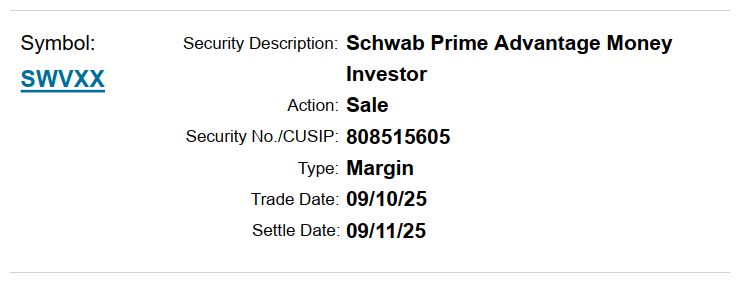
This is an example where the money market mutual fund SWVXX was sold. Here’s what each line is telling you.
Security Description is the name of the holding.
Action will be either “sale” if you no longer hold the security or “purchase” if the security was acquired.
CUSIP is an alternate way to uniquely identify the security.
“Type: Margin” tells you that the brokerage account this was traded in is margin-enabled. It will say this even when no margin is used. We set up most of our taxable accounts as margin-enabled even when we do not plan to use the feature. Margin can act as overdraft protection. If an outbound payment or trade settles before an inbound transfer or sale, the account can briefly cover the gap without a failed transaction. You can read more about this in “What is Margin?”
Trade Date is the date we submit the trade for execution.
Settle Date is the date the trade finished executing. Schwab now provides T+1 settlement, which means that the settle date will typically be the next open market day.
If you have your delivery preferences set for eNotification, then you will receive a reduced version of this information in your email.
If you have your delivery preferences set for paper delivery, then you will receive the full PDF for each trade executed.
By default, we recommend that you set your delivery preferences for eNotification as that keeps your security information out of the plaintext of your email and you don’t need to take action with any of the information in the notice if we are managing your investments.
Photo by Diana Light on Unsplash. Image has been cropped.